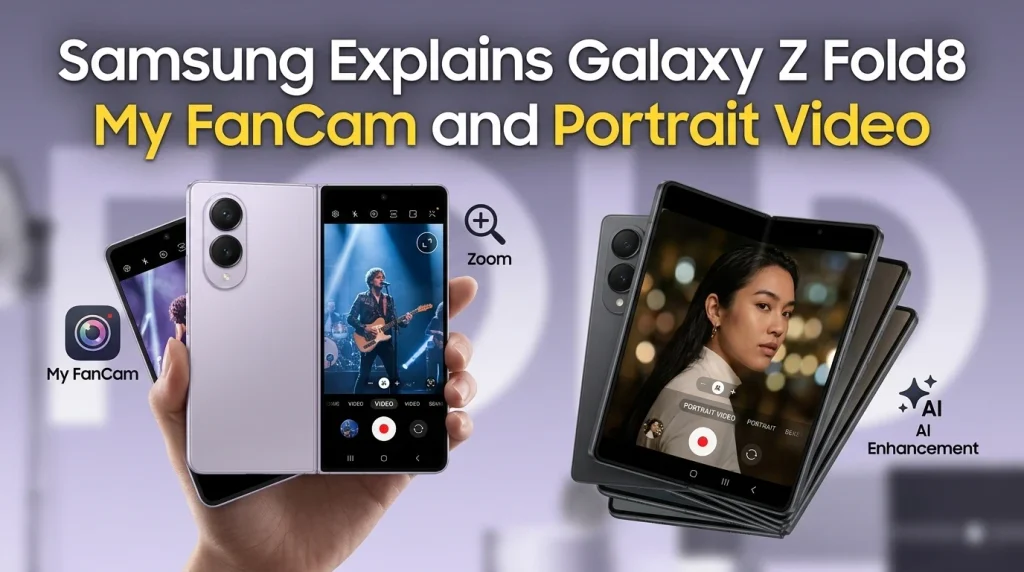
Samsung’s latest Galaxy Z-series camera work takes two different approaches to people-focused video: My FanCam reframes an already-recorded wide shot around a selected person, while the enhanced Portrait Video mode is designed to simulate the depth and bokeh characteristics associated with large-aperture camera lenses. Samsung has now explained more of the engineering behind both features, making the distinction clearer for Galaxy Z Fold8, Z Fold8 Ultra and Z Flip8 users.
What Samsung actually confirmed
- My FanCam is an editing feature: it detects people in an existing video, lets you select a subject, tracks that person and creates a reframed copy in a chosen aspect ratio.
- Portrait Video is a capture/look feature: Samsung says its researchers analysed optical characteristics of real camera lenses and translated those characteristics into computational video processing.
- My FanCam debuted with the Galaxy Z Fold8, Z Fold8 Ultra and Z Flip8 generation and requires a Samsung Account.
- Samsung explicitly warns that My FanCam availability depends on the video and that tracking accuracy is not guaranteed.
My FanCam: record wide, choose the subject later
The practical idea behind My FanCam is straightforward. Instead of trying to keep one person perfectly framed while recording a group, performance or event, the user can capture a wider scene and decide later who should become the focus. Samsung’s support documentation says the workflow happens in Gallery: open a compatible video, tap the Galaxy AI icon, choose My FanCam, select a detected person, choose an aspect ratio, run the tracking process and save the result as a copy.
This is materially different from optical zoom or a camera operator physically following someone. The original recording already exists; Galaxy AI analyses that footage and produces a new crop that follows the selected subject. That makes the feature potentially useful for concerts, school events, sports sidelines and group recordings where the most interesting person may not remain in the same part of the frame.
Important My FanCam limits
Samsung lists several constraints that are easy to miss in promotional demonstrations. Its September 9 support page says My FanCam is not supported for video below 720×720 resolution, cannot be applied again to a video that already has the feature applied, and may fail when people wear similar clothing, appear in difficult poses or are too small in the frame. A Samsung Account login is required. Samsung also says feature availability can vary by video and does not guarantee tracking accuracy.
Those limitations matter because My FanCam should be understood as an assisted editing tool rather than a guarantee that every crowded or distant clip can be rescued. Keeping subjects reasonably large, visible and distinguishable in the original footage should give the software more usable information.
Portrait Video: computational depth rather than simple background blur
Samsung’s engineering interview describes a different goal for Portrait Video. The company says a sharply defined subject against a softly blurred background can create the depth associated with professional large-aperture lenses. Samsung Research studied optical characteristics of actual lenses, while the Mobile eXperience team optimized the processing for Galaxy devices.
The important distinction is that a convincing portrait look is not only about making the background blurry. Real lenses produce depth transitions and out-of-focus rendering with particular spatial characteristics. Samsung says its development work attempted to recreate those characteristics computationally for video. That is a manufacturer description of the design goal, not evidence that a phone produces the same optical result as an interchangeable-lens camera.
My FanCam vs Portrait Video
| Feature | What it does | Best understood as |
|---|---|---|
| My FanCam | Detects and tracks a chosen person in existing footage, then creates a subject-centered crop. | Post-capture reframing and tracking. |
| Portrait Video | Creates a portrait-style depth and bokeh look based on computational modelling of lens characteristics. | Computational portrait rendering. |
Why the difference matters
The two features solve separate problems. My FanCam addresses composition after recording: who should occupy the frame, and how should that person be cropped for a vertical, square or other output? Portrait Video addresses visual separation: how the subject and background should look relative to each other.
A creator could therefore value them for different reasons. My FanCam can reduce the pressure to anticipate every movement while filming a group. Portrait Video is more relevant when the desired result is a subject-isolated, cinematic-looking clip. Neither feature eliminates the basics of smartphone video—lighting, camera stability, subject distance and clean source footage still influence the material the processing has to work with.
Which Galaxy phones are relevant?
Samsung’s current My FanCam support material says the feature started with the Galaxy Z Fold8, Galaxy Z Fold8 Ultra and Galaxy Z Flip8. Availability can vary by region, model, software version and video. Readers considering the Fold8 hardware itself can also see our look at how Samsung reduced the Galaxy Z Fold8 to 201 grams, while our iPhone Duo vs Galaxy Z Fold8 Ultra comparison puts the larger foldable in broader context.
For the wider market picture, PhoneSpecX has also examined why foldable phones reaching 100 million cumulative shipments still leaves a complicated market. Users focused on software can separately review the One UI 9 rollout roadmap.
What is confirmed, and what should not be assumed
Samsung’s own documentation confirms the My FanCam workflow, supported launch devices and several failure conditions. Samsung also describes the research process behind the enhanced Portrait Video effect. What these sources do not establish is that either feature will work perfectly in every scene, that computational bokeh is optically identical to a dedicated camera lens, or that every Galaxy phone will receive My FanCam later. Future device support should therefore be treated as unknown until Samsung documents it.
Frequently asked questions
Is My FanCam the same as Portrait Video?
No. My FanCam tracks and reframes a selected person in recorded footage. Portrait Video is designed to create a portrait-style depth and bokeh appearance.
Does My FanCam work while recording?
Samsung documents it as a Gallery editing workflow applied to an existing video. The user selects the person and output framing after recording.
Which phones launched with My FanCam?
Samsung’s support page identifies the Galaxy Z Fold8, Z Fold8 Ultra and Z Flip8 as the devices on which the feature started.
Why can My FanCam tracking fail?
Samsung says tracking may fail when people wear similar clothing, when poses make recognition difficult, or when subjects are too small. Videos below 720×720 are also unsupported.
Does Portrait Video replace a professional camera lens?
No such claim is supported by Samsung’s documentation. Samsung says it studied real lens characteristics to reproduce a professional-lens-like depth effect computationally; that should not be interpreted as optical equivalence.
Sources and References
- Samsung Global Newsroom — Galaxy Z Series camera innovations: Portrait Video and My FanCam engineering (September 16, 2026)
- Samsung Support India — How to use My FanCam on Galaxy devices (updated September 9, 2026)
- Samsung India — Galaxy Z Fold8 product page and My FanCam availability notes (accessed September 26, 2026)